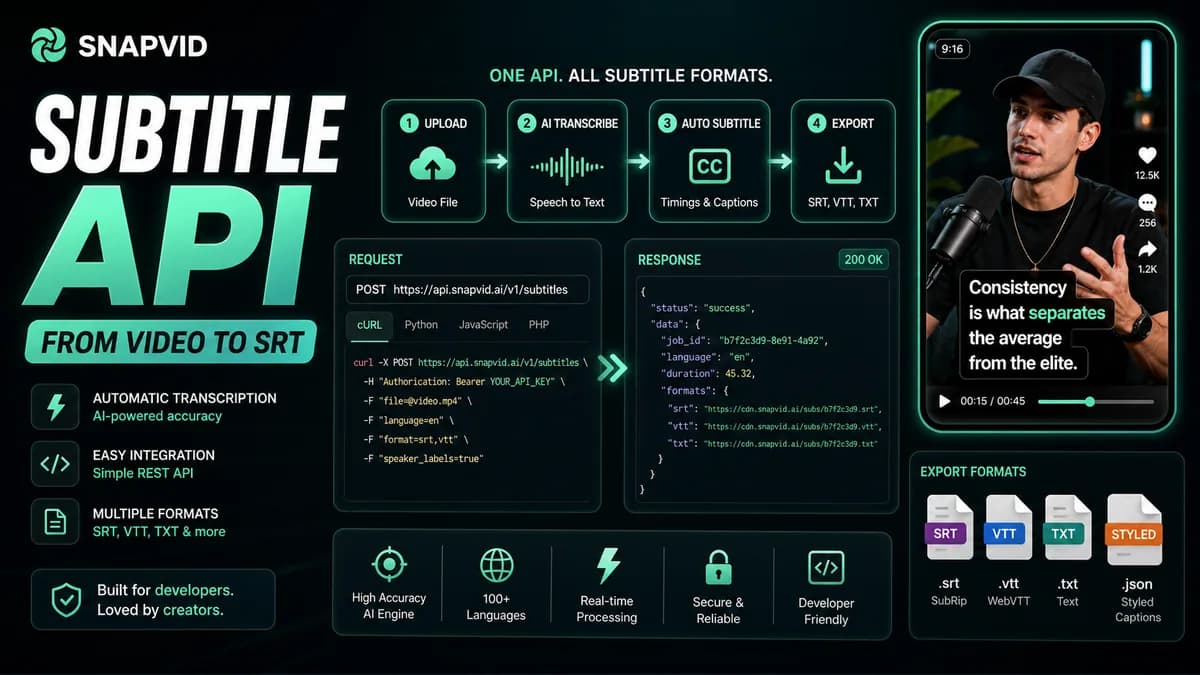













A subtitle API can mean two very different products. A speech-to-text API returns words and timestamps. A styled subtitle or video API continues through cue formatting, visual design, burn-in, rendering, and a final video. Choosing between them is an architecture decision, not a leaderboard decision.
Use the matcher above to define the required output, processing mode, volume, and level of control. Then benchmark three to five providers on the same files. Headline accuracy and per-minute price are not enough to predict production cost.
Subtitle API categories at a glance
| Category | Typical output | Good fit | Work your application still owns |
|---|---|---|---|
| Batch speech-to-text | Transcript, segments, word timestamps | Uploaded podcasts, meetings, videos | Cue rules, SRT/VTT, review, styling, render |
| Streaming speech-to-text | Partial and final real-time text | Live events, calls, voice interfaces | Latency UI, corrections, caption display, recording |
| Subtitle-file service | SRT, VTT, TTML, translated files | Media delivery and localization | Player integration or video burn-in |
| Styled subtitle API | Render instructions or captioned video | Social clips and branded captions | Template choice, QA, distribution |
| General video render API | Final video from JSON/template | Automated media production | Transcription unless separately included |
Providers commonly shortlisted for pure transcription include Deepgram, AssemblyAI, OpenAI speech-to-text models, Speechmatics, Google Cloud Speech-to-Text, AWS Transcribe, and Azure AI Speech. Styled-video workflows may involve ZapCap, Submagic, Captions/Mirage, VEED, Shotstack, Creatomate, or an internal FFmpeg/Remotion pipeline. Product scope and pricing change, so confirm every requirement in current official documentation.
The six stages between audio and a captioned video
1. Media ingestion
Accept uploads or signed URLs, validate format and duration, normalize audio, and define retention. Decide whether the provider fetches customer URLs directly or whether your service uploads bytes. Protect against private-network fetches and unbounded files.
2. Speech recognition
The API identifies speech and returns text. Required details may include language detection, custom vocabulary, punctuation, profanity handling, speaker diarization, channel separation, and word-level timestamps.
3. Caption segmentation
Transcription segments are not automatically readable subtitle cues. A formatter must manage characters per line, line count, reading speed, pauses, sentence structure, speaker changes, and shot boundaries. Test this stage independently from word accuracy.
4. Human or automated correction
Names, numbers, technical terms, and negations deserve priority. Store edits separately from raw provider output so a retranscription does not silently erase approved corrections.
5. Styling and safe placement
Choose font loading, outline or background, word highlighting, animation, speaker colors, vertical position, and collision rules. Preview against actual footage, not a plain background.
6. Burn-in and delivery
Render the captions into the pixels or deliver a sidecar file. Record codec, resolution, frame rate, color information, output URL, expiration, webhook state, and a stable job identifier.
A fair benchmark for three to five APIs
Build a small evaluation set that represents failure, not only clean studio speech:
- Clean single-speaker audio for the baseline.
- Background music and room noise.
- Two speakers who interrupt each other.
- A relevant accent and code-switching sample.
- Names, product vocabulary, numbers, URLs, and abbreviations.
- A long file that exposes timeout, chunking, and drift.
For every provider, record word error examples, proper-noun accuracy, timestamp error, speaker-label quality, first-result latency, completion latency, failure rate, retry behavior, and final cost. For styled output, add line breaking, template consistency, safe placement, render time, output quality, and revision effort.
Do not tune one provider with a custom vocabulary while testing another at defaults. Document every option so the comparison can be reproduced.
Production API design checklist
Jobs and idempotency
Create an internal job before calling the provider. Reusing the same idempotency key should not create duplicate charges or renders. Model queued, processing, succeeded, failed, canceled, and expired states explicitly.
Webhooks and polling
Verify webhook signatures, timestamps, event IDs, and retry delivery. Process events idempotently and keep polling as a controlled recovery path. Never assume events arrive once or in order.
Security and privacy
Document processing regions, subprocessors, encryption, training use, retention, deletion, and access logs. Use short-lived signed URLs and a dedicated storage prefix. Delete source and output according to the customer promise.
Observability
Track p50 and p95 queue time, processing time, render time, error type, provider request ID, retries, minutes processed, output duration, and cost per successful job. Alert on silent delays, not only HTTP failures.
Exit path
Keep a provider-neutral internal representation for words, timestamps, speakers, cues, and styles. Store accepted caption text and render instructions so changing vendors does not require rebuilding every user project.
Calculate total subtitle cost
The bill can include transcription minutes, translation, diarization, rendering, storage, egress, retries, and human review. A cheaper transcript that requires ten more minutes of correction per video may cost more than a higher-priced model.
Model at least three scenarios: current volume, a 10× launch, and a failure-heavy month. Include long-tail job size because a single multi-hour upload can hit timeouts or memory limits that short demos never reveal.
Subtitle API FAQ
What is the difference between transcription and subtitles?
Transcription represents spoken content as text. Subtitles add timing, segmentation, reading constraints, and sometimes translation or visual styling for synchronized display.
Should an API return SRT or word timestamps?
Choose SRT for a quick standard delivery. Choose word timestamps when the application needs custom line breaking, animated word highlighting, search alignment, or provider-independent correction.
When should captions be burned into video?
Burn captions for consistent social presentation or players that cannot load sidecar files. Keep a clean master and sidecar subtitle file when viewers need to toggle languages or accessibility tracks.